
Version archive
Navigating Your Subscriptions – TakeProfitTrader
Version 29/22/2026, 4:30:59 AM
[Skip to main content](https://takeprofittraderhelp.zendesk.com/hc/en-us/articles/15170412478749-Navigating-Your-Subscriptions#main-content) ### What a Subscription Means A subscription is your pathway toward earning a specific PRO account. Under one subscription, you can make multiple attempts (resets) to reach that PRO account without creating a new user. Your Take Profit Trader login gives you one user profile. Inside that profile, you can have: - multiple subscriptions - multiple trading accounts - multiple attempts under each subscription Each subscription represents its own “Journey to Profit.” ### Viewing Your Subscriptions When you log in, you will see all your subscriptions in one list. Each subscription displays: - subscription status (active or disabled) - renewal date - trading accounts created under that subscription Subscriptions renew each month on the same calendar day as the original purchase of the first account under this subscription until passed or canceled. 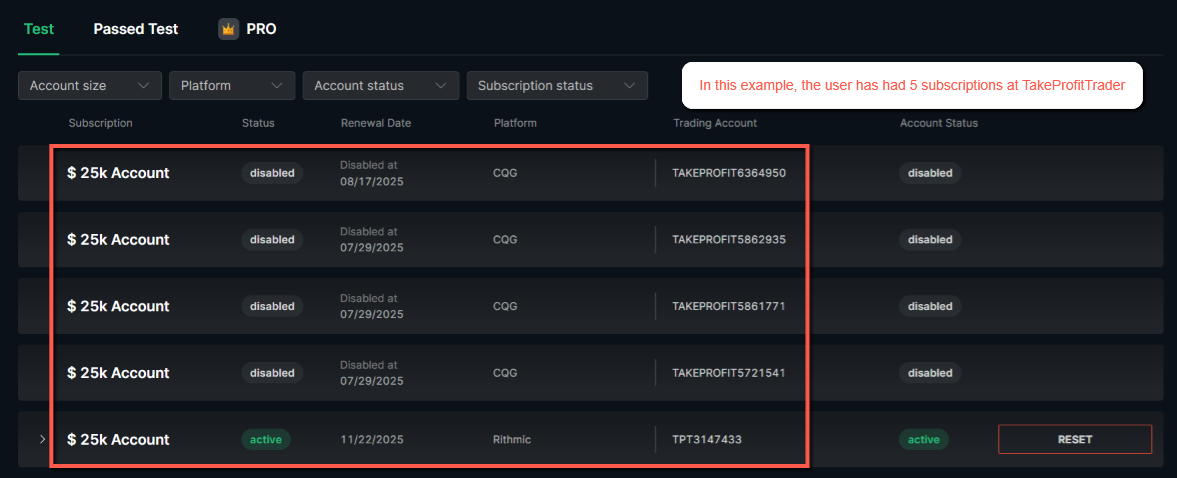 ### Access After Cancellation If you cancel a subscription, you still keep full access for the remainder of the billing cycle. This ensures that you always receive the full month you paid for. ### Opening a Subscription Dashboard Clicking on a subscription opens the trading dashboard for that specific journey. From there, you can view: - your trading accounts - account metrics - platform credentials - progress toward targets - your “How Am I Doing?” section - your NinjaTrader license key You can switch between subscriptions by using the navigation that lists your “Journey to Profit” paths. 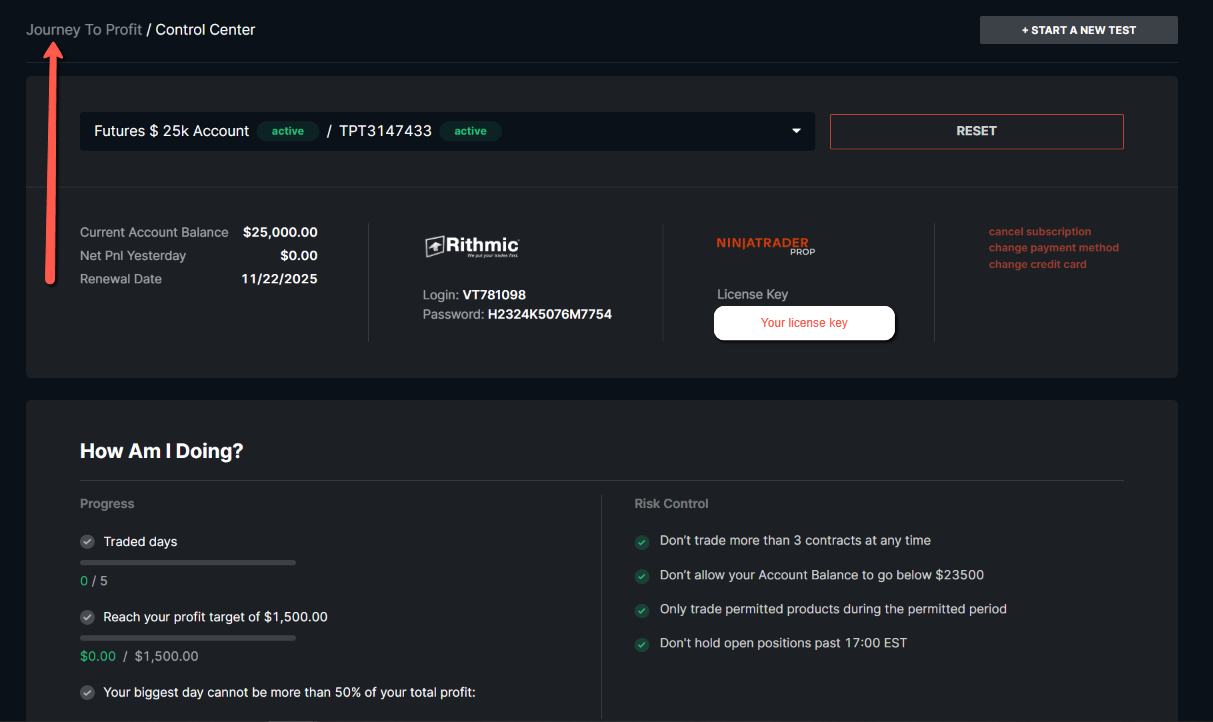 ### Viewing All Accounts Under a Subscription Each subscription can contain multiple trading accounts if you choose to reset. To view all accounts under one subscription: - click the arrow next to the subscription name - all accounts created during past attempts will expand in a list This allows you to review each attempt individually, check trades, and analyze your performance history. 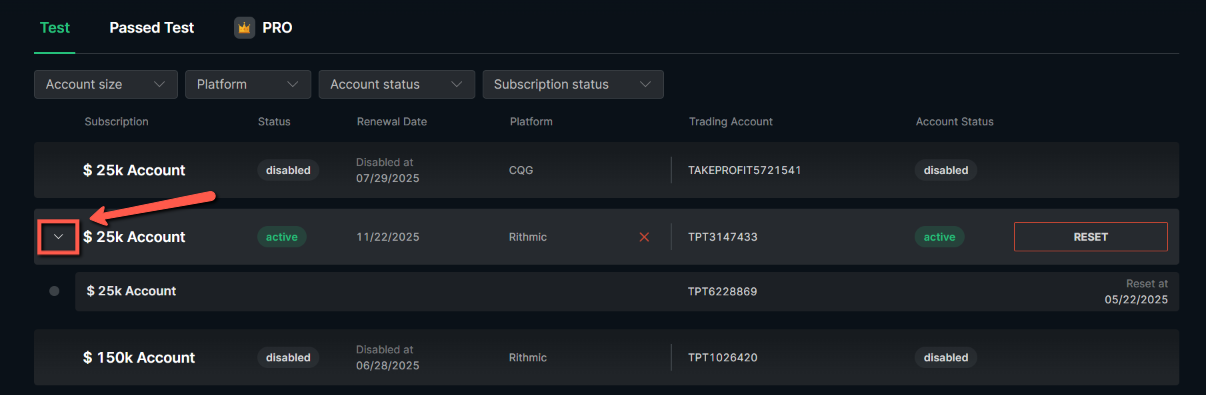 ## Related articles - [Finding Your Accounts](https://takeprofittraderhelp.zendesk.com/hc/en-us/related/click?data=BAh7CjobZGVzdGluYXRpb25fYXJ0aWNsZV9pZGwrCJ34fCbMDToYcmVmZXJyZXJfYXJ0aWNsZV9pZGwrCB0BDCPMDToLbG9jYWxlSSIKZW4tdXMGOgZFVDoIdXJsSSI8L2hjL2VuLXVzL2FydGljbGVzLzE1MTcwNDcwMjEzNzg5LUZpbmRpbmctWW91ci1BY2NvdW50cwY7CFQ6CXJhbmtpBg%3D%3D--d0e889c9b4d1da096b4675a7b9521d5a8ec9b647) - [Activating Your CQG Data Feed](https://takeprofittraderhelp.zendesk.com/hc/en-us/related/click?data=BAh7CjobZGVzdGluYXRpb25fYXJ0aWNsZV9pZGwrCJ1tZrnMDToYcmVmZXJyZXJfYXJ0aWNsZV9pZGwrCB0BDCPMDToLbG9jYWxlSSIKZW4tdXMGOgZFVDoIdXJsSSJEL2hjL2VuLXVzL2FydGljbGVzLzE1MTcyOTM0OTg3MTY1LUFjdGl2YXRpbmctWW91ci1DUUctRGF0YS1GZWVkBjsIVDoJcmFua2kH--ceeebb7bf893be471672746a41f2250a6a34ad8a) - [How to Keep Track Of Your Drawdown](https://takeprofittraderhelp.zendesk.com/hc/en-us/related/click?data=BAh7CjobZGVzdGluYXRpb25fYXJ0aWNsZV9pZGwrCB2p9nbMDToYcmVmZXJyZXJfYXJ0aWNsZV9pZGwrCB0BDCPMDToLbG9jYWxlSSIKZW4tdXMGOgZFVDoIdXJsSSJJL2hjL2VuLXVzL2FydGljbGVzLzE1MTcxODIwMzY2MTA5LUhvdy10by1LZWVwLVRyYWNrLU9mLVlvdXItRHJhd2Rvd24GOwhUOglyYW5raQg%3D--a8e7aea977292f66ba21403a285457bd1a94ea76) - [PRO Account Profit Split & Withdrawal Rules](https://takeprofittraderhelp.zendesk.com/hc/en-us/related/click?data=BAh7CjobZGVzdGluYXRpb25fYXJ0aWNsZV9pZGwrCJ1hwY7MDToYcmVmZXJyZXJfYXJ0aWNsZV9pZGwrCB0BDCPMDToLbG9jYWxlSSIKZW4tdXMGOgZFVDoIdXJsSSJQL2hjL2VuLXVzL2FydGljbGVzLzE1MTcyMjE5NTI3NTgxLVBSTy1BY2NvdW50LVByb2ZpdC1TcGxpdC1XaXRoZHJhd2FsLVJ1bGVzBjsIVDoJcmFua2kJ--d2f97daee491d8464541f24ed52a64f76837ae1a) - [TPT's Rewards System](https://takeprofittraderhelp.zendesk.com/hc/en-us/related/click?data=BAh7CjobZGVzdGluYXRpb25fYXJ0aWNsZV9pZGwrCJ2gtX4CDzoYcmVmZXJyZXJfYXJ0aWNsZV9pZGwrCB0BDCPMDToLbG9jYWxlSSIKZW4tdXMGOgZFVDoIdXJsSSI7L2hjL2VuLXVzL2FydGljbGVzLzE2NTAzMzkwMTgzNTgxLVRQVC1zLVJld2FyZHMtU3lzdGVtBjsIVDoJcmFua2kK--a3f48d716d55822beb859dbf48267fd55b44089c) Ada X Storage
SHA-256 6e48890f644885c5d192a76973632f658984c67bcbd325c6004b7cb499ae6c52
Version 18/17/2026, 11:45:56 AM
[Skip to main content](https://takeprofittraderhelp.zendesk.com/hc/en-us/articles/15170412478749-Navigating-Your-Subscriptions#main-content) ### What a Subscription Means A subscription is your pathway toward earning a specific PRO account. Under one subscription, you can make multiple attempts (resets) to reach that PRO account without creating a new user. Your Take Profit Trader login gives you one user profile. Inside that profile, you can have: - multiple subscriptions - multiple trading accounts - multiple attempts under each subscription Each subscription represents its own “Journey to Profit.” ### Viewing Your Subscriptions When you log in, you will see all your subscriptions in one list. Each subscription displays: - subscription status (active or disabled) - renewal date - trading accounts created under that subscription Subscriptions renew every 30 days until canceled.  ### Access After Cancellation If you cancel a subscription, you still keep full access for the remainder of the billing cycle. This ensures that you always receive the full 30 days you paid for. ### Opening a Subscription Dashboard Clicking on a subscription opens the trading dashboard for that specific journey. From there, you can view: - your trading accounts - account metrics - platform credentials - progress toward targets - your “How Am I Doing?” section - your NinjaTrader license key You can switch between subscriptions by using the navigation that lists your “Journey to Profit” paths.  ### Viewing All Accounts Under a Subscription Each subscription can contain multiple trading accounts if you choose to reset. To view all accounts under one subscription: - click the arrow next to the subscription name - all accounts created during past attempts will expand in a list This allows you to review each attempt individually, check trades, and analyze your performance history.  ## Related articles - [Finding Your Accounts](https://takeprofittraderhelp.zendesk.com/hc/en-us/related/click?data=BAh7CjobZGVzdGluYXRpb25fYXJ0aWNsZV9pZGwrCJ34fCbMDToYcmVmZXJyZXJfYXJ0aWNsZV9pZGwrCB0BDCPMDToLbG9jYWxlSSIKZW4tdXMGOgZFVDoIdXJsSSI8L2hjL2VuLXVzL2FydGljbGVzLzE1MTcwNDcwMjEzNzg5LUZpbmRpbmctWW91ci1BY2NvdW50cwY7CFQ6CXJhbmtpBg%3D%3D--d0e889c9b4d1da096b4675a7b9521d5a8ec9b647) - [Activating Your CQG Data Feed](https://takeprofittraderhelp.zendesk.com/hc/en-us/related/click?data=BAh7CjobZGVzdGluYXRpb25fYXJ0aWNsZV9pZGwrCJ1tZrnMDToYcmVmZXJyZXJfYXJ0aWNsZV9pZGwrCB0BDCPMDToLbG9jYWxlSSIKZW4tdXMGOgZFVDoIdXJsSSJEL2hjL2VuLXVzL2FydGljbGVzLzE1MTcyOTM0OTg3MTY1LUFjdGl2YXRpbmctWW91ci1DUUctRGF0YS1GZWVkBjsIVDoJcmFua2kH--ceeebb7bf893be471672746a41f2250a6a34ad8a) - [How to Keep Track Of Your Drawdown](https://takeprofittraderhelp.zendesk.com/hc/en-us/related/click?data=BAh7CjobZGVzdGluYXRpb25fYXJ0aWNsZV9pZGwrCB2p9nbMDToYcmVmZXJyZXJfYXJ0aWNsZV9pZGwrCB0BDCPMDToLbG9jYWxlSSIKZW4tdXMGOgZFVDoIdXJsSSJJL2hjL2VuLXVzL2FydGljbGVzLzE1MTcxODIwMzY2MTA5LUhvdy10by1LZWVwLVRyYWNrLU9mLVlvdXItRHJhd2Rvd24GOwhUOglyYW5raQg%3D--a8e7aea977292f66ba21403a285457bd1a94ea76) - [PRO Account Profit Split & Withdrawal Rules](https://takeprofittraderhelp.zendesk.com/hc/en-us/related/click?data=BAh7CjobZGVzdGluYXRpb25fYXJ0aWNsZV9pZGwrCJ1hwY7MDToYcmVmZXJyZXJfYXJ0aWNsZV9pZGwrCB0BDCPMDToLbG9jYWxlSSIKZW4tdXMGOgZFVDoIdXJsSSJQL2hjL2VuLXVzL2FydGljbGVzLzE1MTcyMjE5NTI3NTgxLVBSTy1BY2NvdW50LVByb2ZpdC1TcGxpdC1XaXRoZHJhd2FsLVJ1bGVzBjsIVDoJcmFua2kJ--d2f97daee491d8464541f24ed52a64f76837ae1a) - [TPT's Rewards System](https://takeprofittraderhelp.zendesk.com/hc/en-us/related/click?data=BAh7CjobZGVzdGluYXRpb25fYXJ0aWNsZV9pZGwrCJ2gtX4CDzoYcmVmZXJyZXJfYXJ0aWNsZV9pZGwrCB0BDCPMDToLbG9jYWxlSSIKZW4tdXMGOgZFVDoIdXJsSSI7L2hjL2VuLXVzL2FydGljbGVzLzE2NTAzMzkwMTgzNTgxLVRQVC1zLVJld2FyZHMtU3lzdGVtBjsIVDoJcmFua2kK--a3f48d716d55822beb859dbf48267fd55b44089c) Ada X Storage
SHA-256 95a3621d6cb9e53dc6404fd987b4f3b6d9a3e409e3f7202cf1b1e0a26222ccf7